02 · Article
On this page19 sections
- Why simulator automation matters
- What I automate first
- The QA loop this enables
- The screenshot pipeline
- What still needs human judgment
- What the automation stack looks like
- The setup that avoids pain
- Common failure points
- What I automate beyond screenshots
- Why I treat this as infrastructure
- The QA safety net
- The maintenance reality
- Where this plugs into CI
- How this supports marketing too
- The “boring” wins
- Why this stays on the roadmap
- Related Guides
- Related Stories
- Learn More
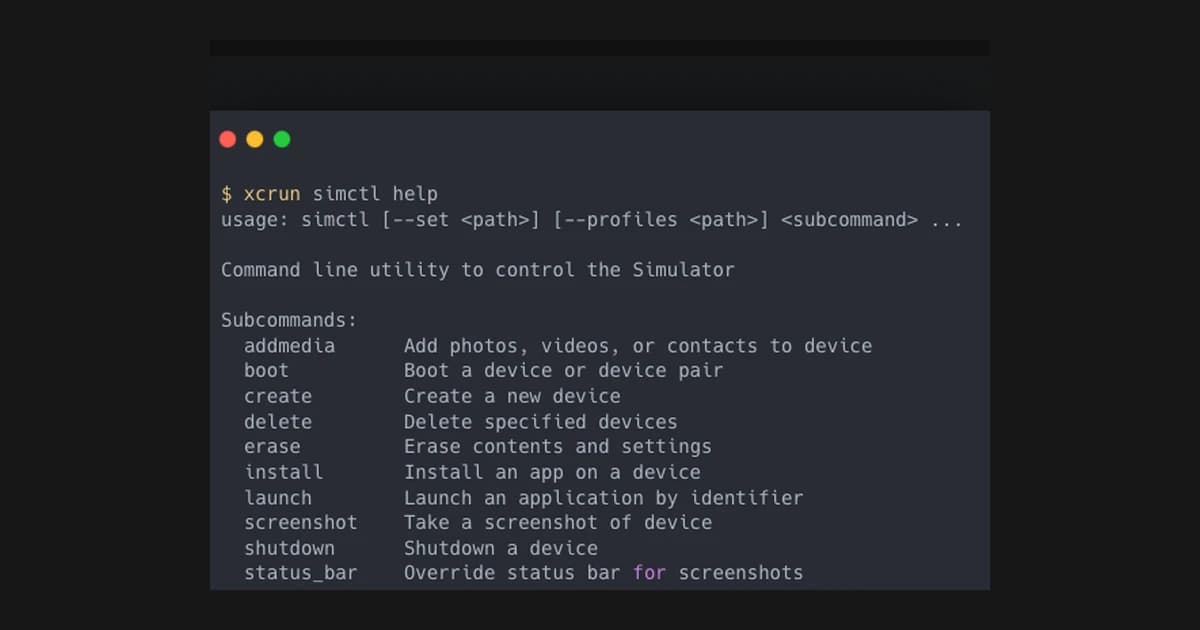
The iOS Simulator is great until you have to do the same flow ten times in a row. Reset, boot, install, launch, click around, take screenshots, repeat. Manual work makes small releases feel heavier than they should.
I started with a handful of simctl commands and quickly realized the problem was not the tools, it was the workflow. The commands were powerful, but they were scattered and brittle. I needed a single, repeatable entry point.
The skill-ios-simulator wrapper pulls the common steps into a predictable sequence: boot a clean device, install a build, launch into a known screen, and optionally drive scripted UI checkpoints. That means QA runs can be reset quickly and demo flows can be repeated without guessing where I left off.
The second win is screenshots. A single command can step through a tour and capture a clean set of assets without me babysitting the simulator. It keeps releases consistent and makes it easier to ship on a tight timeline.
This is still a working draft of the workflow. The core routines are stable, but I expect the script set to grow as new teams and apps use it. The goal is simple: fewer manual steps, more reliable output.
Why simulator automation matters
Manual simulator work is deceptively expensive. It feels fast in the moment, but it scales poorly across releases. Every time you “just click through” you are paying the tax later: inconsistent screenshots, missed states, and demo flows that break when the app changes.
Automation turns that into a repeatable routine. If the simulator can be booted, set up, and driven through the same path every time, you stop losing hours to cleanup.
What I automate first
The first scripts I write are boring:
- boot a known device
- clear data and reinstall the app
- navigate to the same onboarding or demo flow
- capture screenshots at stable checkpoints
These are not glamorous, but they remove 80% of the friction.
The QA loop this enables
Once you have repeatable flows, you can build a QA loop that scales:
- run the automation before every release
- diff screenshots for visual regressions
- re‑run if any screen fails to render
It gives you confidence without a full QA team.
The screenshot pipeline
Screenshots are where this matters most. A consistent set of assets is what makes releases feel professional. Automating the screenshot flow means:
- every release has fresh, accurate images
- marketing assets stay aligned with reality
- App Store submissions are faster and less error‑prone
That alone saves hours every release.
What still needs human judgment
Automation does not replace product judgment. It handles the repeatable parts, but it cannot decide if a new UI looks good or if a flow makes sense. The goal is not to replace human review, but to reduce the mechanical steps so human judgment can focus on the real decisions.
What the automation stack looks like
My simulator pipeline is intentionally small:
- MCP layer to define repeatable actions
- A simple runner to orchestrate flows (boot, install, navigate, capture)
- A screenshot script that outputs consistent assets
The goal is not sophistication. The goal is determinism.
The setup that avoids pain
The simulator breaks most often for two reasons: stale runtimes and inconsistent device state. I keep the setup boring:
- reset devices before capture runs
- boot a single, known device every time
- keep the OS version pinned for a release cycle
That small discipline prevents the 2am “why is this different” debugging spiral.
Common failure points
The most common failures are boring:
- simulator not installed or not selected in Xcode
- stale booted device state
- screenshots captured before data is fully loaded
I handle these with a pre‑flight checklist and a retry loop. If the output is not stable, the run fails and forces a reset. That keeps assets consistent.
What I automate beyond screenshots
Once the simulator is stable, you can extend the same flow to:
- run onboarding smoke tests
- validate paywall screens
- verify that localization strings render correctly
- capture product walkthrough clips for marketing
The same infrastructure supports QA and marketing. That is the leverage.
Why I treat this as infrastructure
Once you have simulator automation, it becomes part of the build system. It is not a “nice to have.” It is the same category as tests and CI. The payoff is not just speed — it is reliability.
That is why I am investing in it. It turns a messy, manual process into a predictable machine.
The QA safety net
Once automation exists, I can run a quick smoke test before every release:
- install build
- complete onboarding
- verify paywall state
- capture new screenshots
Even if it only runs the happy path, it catches 80% of regressions early.
The maintenance reality
Automation does not eliminate work. It changes the work from “manual clicks” to “script upkeep.” The scripts must be versioned and reviewed like any other code. That is the trade‑off I accept because it scales.
Where this plugs into CI
Once you have a reliable simulator script, you can hook it into CI:
- generate screenshots on every release branch
- run a quick onboarding smoke test
- fail the build if a critical flow breaks
It is not a replacement for QA. It is a safety net that catches obvious regressions early.
How this supports marketing too
The same automation that captures App Store screenshots can also capture marketing assets. Short walkthrough clips, onboarding flows, or new feature highlights can all be generated from the same scripted path. That means marketing and QA share the same ground truth.
The “boring” wins
Once the system is in place, the wins feel boring:
- fewer late‑night screenshot sessions
- fewer missing or out‑of‑date assets
- less anxiety before submission
That is a good trade. The goal is not excitement. It is reliability.
Why this stays on the roadmap
Automation is easy to deprioritize because it does not feel like “product work.” But every release without it accumulates cost. I keep it on the roadmap because it pays back every release after the first. The ROI is not a single win; it is the lack of repeated pain.
If you ship iOS apps regularly, simulator automation is infrastructure. It becomes the quiet system that keeps your product and marketing in sync.
Related Guides
- CLI Automation Guide — Practical CLI automation
- Overnight AI Builds Guide — Automate overnight work
- Solo Founder AI Stack — The lean automation stack
Related Stories
- Building 3 App Store CLIs — Automating release workflows
- Shipping an iOS App Solo in 2026 — The full iOS shipping playbook
Learn More
For a complete automation system, start with AI Automation Fundamentals.