02 · Article
On this page21 sections
- The pain was not the work, it was the repetition
- Why a CLI made sense
- What I built
- What these CLIs actually do
- The release workflow I use now
- The design goals that guided the build
- What changed in practice
- The bigger lesson
- What I am thinking about next
- How I decide what to automate
- What “good enough” looks like
- The adoption test
- What I will open‑source later
- What I would document before open‑sourcing
- The long‑term bet
- The checklist that keeps releases calm
- Why the tooling is still in development
- The broader pattern
- Related Guides
- Related Stories
- Learn More
Automation is not a nice-to-have anymore. It is the difference between shipping and babysitting dashboards.
I hit a point where I was spending too much time clicking through three different stores just to do the same routine work. Google Play Console, Chrome Web Store, and the App Store each had their own flows, their own quirks, and none of them talked to each other.
I wanted one surface. One place where releases, metadata, and assets could be handled the same way. So I built it.
The pain was not the work, it was the repetition
Most store tasks are not hard. They are just tedious. Upload this. Update that. Confirm the same settings you confirmed last week.
The problem is the switching cost. Each dashboard has a different layout. Each has its own terminology. You spend your energy re-orienting instead of shipping.
That was the breaking point for me. If I was going to keep shipping products, I needed to stop burning time on UI choreography.
Why a CLI made sense
A command line is the opposite of a dashboard. It is fast, scriptable, and predictable. It is also the place I already live when I am building.
A CLI lets you turn a messy, manual process into a repeatable workflow. It can live in a shell script, a CI pipeline, or just a saved command.
Most importantly, a CLI can match your brain. You name the verbs. You choose the defaults. You control the flow.
What I built
I ended up with four tools:
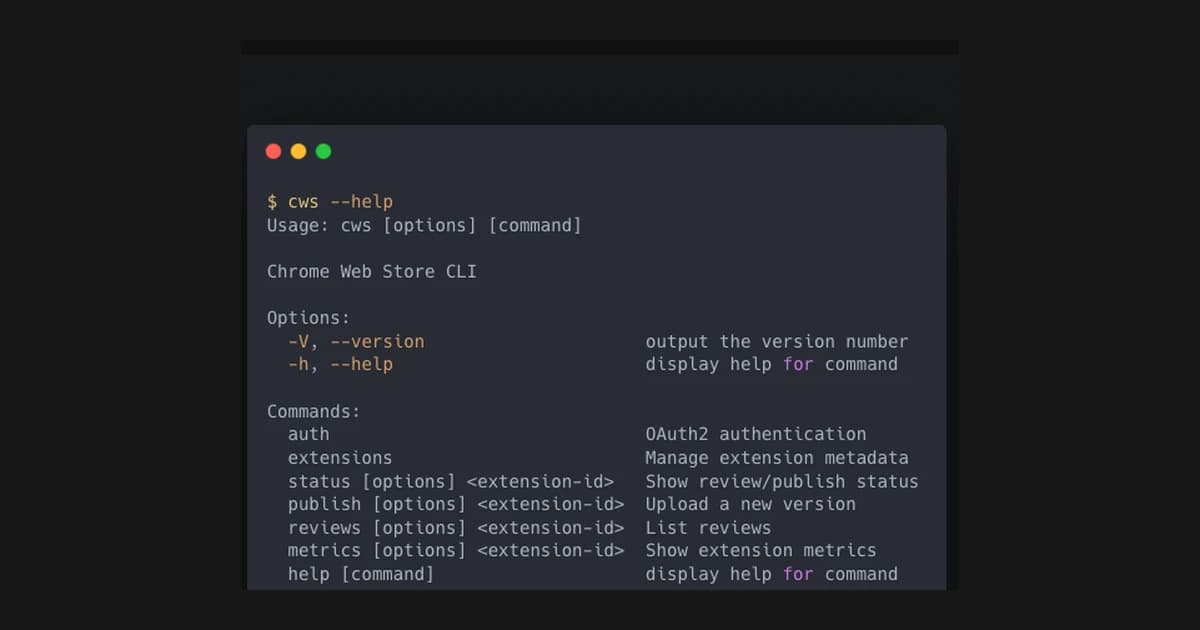
gplay-clifor Google Play Console managementcws-clifor Chrome Web Store publishingappstore-clifor App Store managementbleeps, a procedural 8-bit audio library to keep the fun in the toolbox
The first three are the workhorses. The fourth is a small joy project that plugs into scripts and experiments when I need a break from dashboards and deploys.
All four live on my GitHub account. bleeps is public. The store CLIs are private for now while I decide how to package and release them.
What these CLIs actually do
Each tool is narrow and boring by design. I am not trying to recreate the whole dashboard. I am trying to turn the top repeat tasks into commands that are predictable and fast.
That means things like:
- list apps
- check release status
- upload a new build
- promote a build between tracks
- update store metadata and screenshots
The point is not full coverage. The point is covering the 80% that happens every week.
The release workflow I use now
The workflow is simple enough that it fits in a README:
- Prepare a build
- Upload with the CLI
- Promote to the right track
- Swap metadata or screenshots
- Verify status from the terminal
When that flow is codified, I do not need to remember UI steps. I need to remember the commands. That reduces mental load and makes releases feel consistent.
The design goals that guided the build
I did not want four different tools with four different mental models. The point was to normalize the work.
So I aimed for a few simple principles:
- Same verbs across stores when the tasks are the same.
- Clear, predictable commands over clever abstractions.
- A workflow that can run in CI or by hand without surprises.
That meant thinking in terms of outcomes instead of dashboards. Releases, metadata updates, status checks, asset swaps. The exact UI screens do not matter if the command gets the outcome.
What changed in practice
The dashboards still exist. I just do not treat them as the source of truth anymore.
When I need to check status or push a change, I reach for the terminal first. That shift sounds small, but it changes the entire rhythm of a release.
Instead of stopping to navigate three admin panels, I can keep moving. Instead of wondering which step I am on, I can read it in a script. That consistency brings back a lot of focus.
I have not eliminated manual work entirely. The stores are still the stores. But I have reduced the number of times I have to re-learn their interfaces.
The bigger lesson
Building internal tools that match your workflow is a force multiplier. It is a short investment that pays you back every single week.
The tools do not need to be perfect. They need to be honest. They need to reduce friction and keep you in flow.
This is why I keep building them. Not because I love building tooling for its own sake, but because I want the work to feel clean.
If you are stuck clicking the same buttons every week, that is a signal. It is a place where a tool can earn its keep.
What I am thinking about next
I am still deciding how much of these tools to open up. There is a balance between polishing for release and keeping them focused on my own workflow.
Either way, the result is already working: fewer dashboards, more shipping. That is the entire goal.
How I decide what to automate
If a task happens weekly and is boring, it qualifies. If it happens monthly and is painful, it also qualifies. If it happens once a year, I do it manually and move on. The rule is simple: automate the repeatable, ignore the rare.
This prevents tool sprawl. The goal is not to automate everything. The goal is to remove the few recurring pain points that slow shipping.
What “good enough” looks like
A good internal tool does not need polish. It needs to be reliable and predictable. If a CLI does the same thing every time, I can trust it. That trust is what creates speed.
The adoption test
If the tool is real, I use it without thinking. If I have to open the dashboard “just this once,” the tool failed the adoption test. The adoption test is the only signal I trust.
If it fails, I fix the command or I delete it. There is no middle ground.
What I will open‑source later
I will open‑source these once they are boring:
- commands are stable
- errors are clear
- docs are complete
If they are not boring, they are not ready for other people.
What I would document before open‑sourcing
If I open these tools up, the bare minimum is boring:
- clear install steps
- safe defaults
- predictable error messages
- a quick‑start that actually works
Without that, it’s a support burden and not a tool.
The long‑term bet
The long‑term bet is that release workflows should feel like code, not like clicking. That’s why I keep investing in CLI workflows. They are composable, scriptable, and easy to audit.
Curious: what is the last internal tool you built that changed how you work?
The checklist that keeps releases calm
I keep a small checklist next to the CLIs:
- verify app ID and track
- confirm metadata changes
- check screenshots are current
- run a quick status check before promotion
It is not sophisticated. It just prevents sloppy mistakes.
Why the tooling is still in development
The CLIs are private because they are still evolving. The commands are stable, but the error handling and docs are not where I want them. If I release them, I want a clean interface, good defaults, and predictable outcomes. That takes time.
For now the priority is velocity in my own workflow, not a polished product. When it is ready, I will open it up. Until then, it stays internal and useful.
The broader pattern
Most teams do not need more tools. They need fewer tools that feel reliable. That is what these CLIs are for. They shrink the surface area of release work and let you move through the same steps every time without friction.
That is the real win: less dashboard drift, more shipping.
Related Guides
- CLI Automation Guide — Practical CLI automation with gog, oracle, and qmd
- Solo Founder AI Stack — Compete with agencies
- Overnight AI Builds Guide — Automate overnight work
Related Stories
- Automating the iOS Simulator — Another CLI automation story
- The Overnight Build Experiment — Using automation while you sleep
Learn More
For a full automation workflow, start with AI Automation Fundamentals.