02 · Article
On this page13 sections
Hook
I opened a blank Xcode project on Christmas Eve and wrote one line in a notes app: "Make resolutions feel like progress, not guilt." Twenty-four days later, I submitted the build in App Store Connect with a working paywall and a clear plan for what ships next. It felt like a real milestone.
AI did not replace the work. It compressed the loop. I used it for implementation drafts, browser tasks, and fast back-and-forth when I was stuck. The difference was not magic. The difference was that every step got smaller and faster.
Build Loop + Stack
The build loop was tight and repetitive:
- Define the screen and the rules in plain English.
- Ask Claude to draft the implementation and the data flow.
- Run it on device, fix the edges, and commit.
- Move to the next screen without dragging old context along.
That loop kept me shipping. It also let me keep product decisions in my head instead of a ticket queue. I could decide, build, and validate in the same hour.
Each loop had a definition of done. A screen counted as done when a user could complete the action without reading documentation. If the flow needed explanation, I cut it or simplified it. That rule kept the scope honest and the UI lean.
Claude worked best when I treated it like a senior pair. I would paste a short spec and constraints, then ask for a SwiftUI view plus the service changes. If it produced too much code, I narrowed the prompt and asked for only the part I needed.
The stack was chosen for speed and reliability, not novelty.
The product scope was three flows: create a resolution, log progress, and review the streak. Everything else was a bonus. The more I respected that boundary, the easier it was to say no.
SwiftUI for the UI and layout. It let me iterate quickly and keep the app feeling native without wrestling UIKit.
Supabase for auth, database, and sync. I needed a backend that could handle user accounts and real time updates without me running servers.
RevenueCat for subscriptions. I wanted a clean paywall flow and a reliable purchase layer that I did not have to build myself.
App Store Connect for distribution. No surprises there, but it becomes a real part of the engineering loop when you are solo.
Claude for two roles: code drafting inside the editor and browser automation for the repetitive dashboard work.
The core architecture is a set of small services: auth, sync, gamification, subscription. The UI talks to those services, and the services talk to Supabase or RevenueCat. This is boring on purpose. Boring systems are reliable, and reliability matters when the app is about consistency.
Sync was the riskiest part. Progress entries can be created offline and merged later. I kept the merge rules small and deterministic so I could test them without pages of edge cases.
Testing mattered because the app is about habit. A single broken streak calculation destroys trust. The project includes unit tests around XP, streaks, and conflict resolution, plus a minimal UI test to cover the first run path. I did not aim for perfect coverage. I aimed for the moments that would hurt if they broke. That kept the test suite small and focused, which is the only way I will keep running it.
The result was a steady cadence. I shipped 42 commits in 24 days without a team or a backlog of half finished features. The project moved because the loop was short and the surface area was controlled.
A few implementation details mattered more than expected:
- The data model had to be stable early. The gamification system touches everything, so I locked the schema down before the UI got fancy.
- Sync logic needed tests. I added test coverage for conflict resolution and streak calculations because one edge case can ruin trust.
- Every screen needed a single primary action. This kept the app usable even when features grew.
This is the part most people miss. The AI did not decide the architecture. It accelerated decisions I had already made. The faster the loop, the more important those decisions become.
App Store Connect + RevenueCat Bottleneck
The only real bottleneck was the App Store billing stack.
On paper, it is simple. Create your in app purchase products in App Store Connect, wait for them to be ready, then map them in RevenueCat. In practice, every step has a delay or a hidden dependency. A product ID that is wrong or not fully processed blocks the paywall. An entitlement that is not mapped correctly breaks the upgrade flow. A package pointing to an old product makes testing meaningless.
App Store Connect and RevenueCat speak different languages. App Store Connect cares about IAP products, price tiers, and review state. RevenueCat cares about offerings, entitlements, and packages. The link between them is a product ID string. If that string is wrong, nothing else matters.
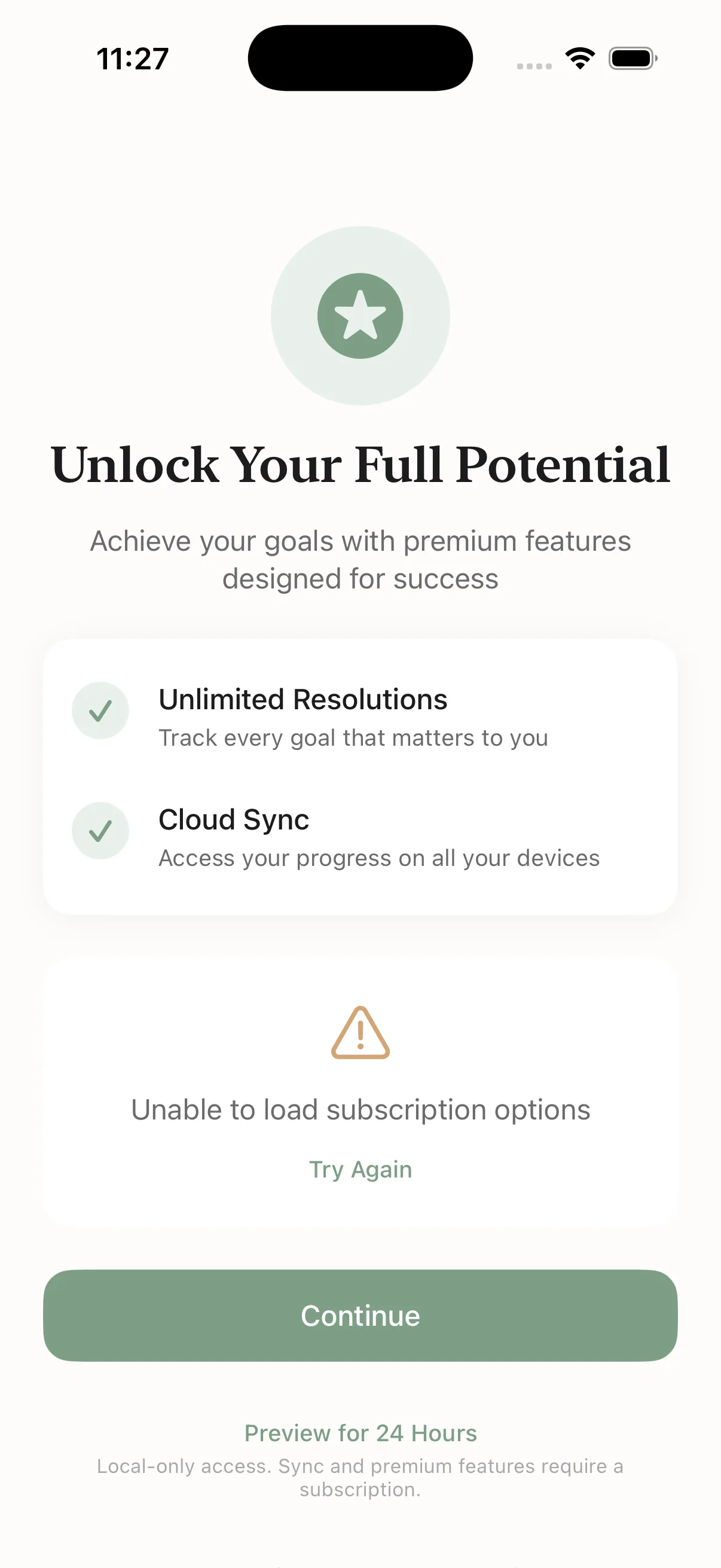
I hit this right before submission. I had new product IDs for weekly and annual plans, but the RevenueCat packages were still pointing at the old products. That meant the paywall was visually correct but functionally broken. It is the kind of bug that only shows up late because you do not feel it until you run a purchase.
Fixing it was not difficult, but it was manual and slow. I had to open RevenueCat, update the package bindings, and confirm the products actually matched the App Store Connect entries. This is where a solo builder gets stuck, not because the code is hard, but because the dashboards are brittle.
Before I could move on, I had to verify a small checklist:
- App Store Connect products were in the right state.
- RevenueCat packages pointed to the new product IDs.
- Entitlements matched the feature gates in the app.
- Sandbox purchases granted premium access correctly.
This was the exact moment where Claude in Chrome earned its keep.
Claude in Chrome Steps
I used Claude in Chrome to handle the RevenueCat updates while I stayed focused on the build.
The steps were straightforward, but they are easy to mess up if you are doing them tired or in a rush. I wanted the process written down and repeatable.
- Open RevenueCat and navigate to the Resolution Tracker project.
- Go to Products and find the packages list.
- Open the Annual package and switch it to the new annual product ID.
 Caption: Claude in Chrome selecting the new annual product for the package.
- Scroll to the Weekly package and switch it to the new weekly product ID.
- Save the changes and run a sanity check.
 Caption: Confirmation step after the RevenueCat updates were applied.
I do not hand off everything to the browser agent. I use it when the task is repetitive, click heavy, and easy to misclick. This is exactly that kind of task. It is also the kind of task that blocks the release if you get it wrong.
The larger point is not the tool. It is the workflow. Make the slow part deterministic so you can focus on the product decisions that actually matter.
The release checklist I use now
Before I submit any build, I run a quick release checklist that keeps the last‑mile work predictable:
- screenshots match the current UI
- subscription products map cleanly to RevenueCat offerings
- privacy URLs are correct and live
- onboarding matches the store description
- paywall grants access correctly in sandbox
It is not glamorous, but it prevents 80% of the mistakes that slow approvals.
Where Claude actually saved time
The biggest leverage was not in code generation. It was in the operations layer:
- navigating App Store Connect without missing required fields
- updating RevenueCat packages with the correct product IDs
- sanity‑checking that each package matched the intended tier
Claude in Chrome acted like a second set of eyes. It removed the “scroll‑and‑forget” mistakes that usually slow submissions.
The stack that kept it light
I kept the stack intentionally small:
- React Native + Expo for the app
- Supabase for auth and data
- RevenueCat for subscriptions
- Claude for implementation and ops
It is a boring stack. That is the point. It minimizes time spent on infrastructure and maximizes time spent on the loop that matters.
Outcome + Lessons
The build is submitted. The paywall is wired. The core loop works. The app now does the job it was built to do: turn a vague resolution into a daily feedback loop that feels good to complete.
I am still waiting on App Store review, but the hard part is already done. The product is real, the purchase flow is real, and the TestFlight upload is next.
The next pass is about learning, not building. I want to see where people drop off in the first session, whether the streak loop feels motivating, and how the premium upsell lands. Those signals will decide the next features more than any wishlist.
The lessons are simple and sharp:
- The loop is the product. Short loops make better decisions because you feel the consequences immediately.
- AI works best as a drafting partner, not a decider. It speeds you up if you are already clear.
- Store operations are engineering. Treat them like code. Document them, automate them, and reduce variance.
- Paywall wiring is never a last minute task. It should be built and tested early or it will stall the release.
- The last mile is not glamorous. It is dashboards, product IDs, and save buttons. It still decides whether you ship.
What I would improve next
Two things are on the short list:
- Onboarding clarity — reduce steps, make the first action feel obvious.
- Retention signals — make progress more visible so users feel momentum early.
The app already works, but these changes will make it stickier. That is the difference between a nice launch and a durable product.
Why I am keeping the scope tight
It is tempting to add features. I am resisting that for now. The loop works because it is simple. More features often mean more friction. My goal is to deepen the habit loop before expanding the surface area.
If you are holding an idea because you think shipping is too heavy, it is not. It is just a loop you have not tightened yet. The tools are finally good enough. The question is whether you are willing to run the loop every day until the app is real.
Related Guides
- How to Ship AI Products Fast — The 2-3 week playbook
- AI MVP in One Week — Day-by-day sprint plan
- Solo Founder AI Stack — Compete with agencies
Related Stories
- Shipping an iOS App Solo in 2026 — The full Claude Code playbook
- Shipping an iOS App Solo — Another perspective
Learn More
For the complete shipping system, join the AI Product Building Course.