02 · Article
On this page13 sections
- The constraints that shaped the workflow
- What I learned from the “manual” era
- What changed with agentic tools
- Why I keep this story
- How I structure requests now
- The role of artifacts
- What I still do manually
- Why this matters beyond AI
- The question I ask before every prompt
- Why this still matters
- Related Guides
- Related Stories
- Learn More
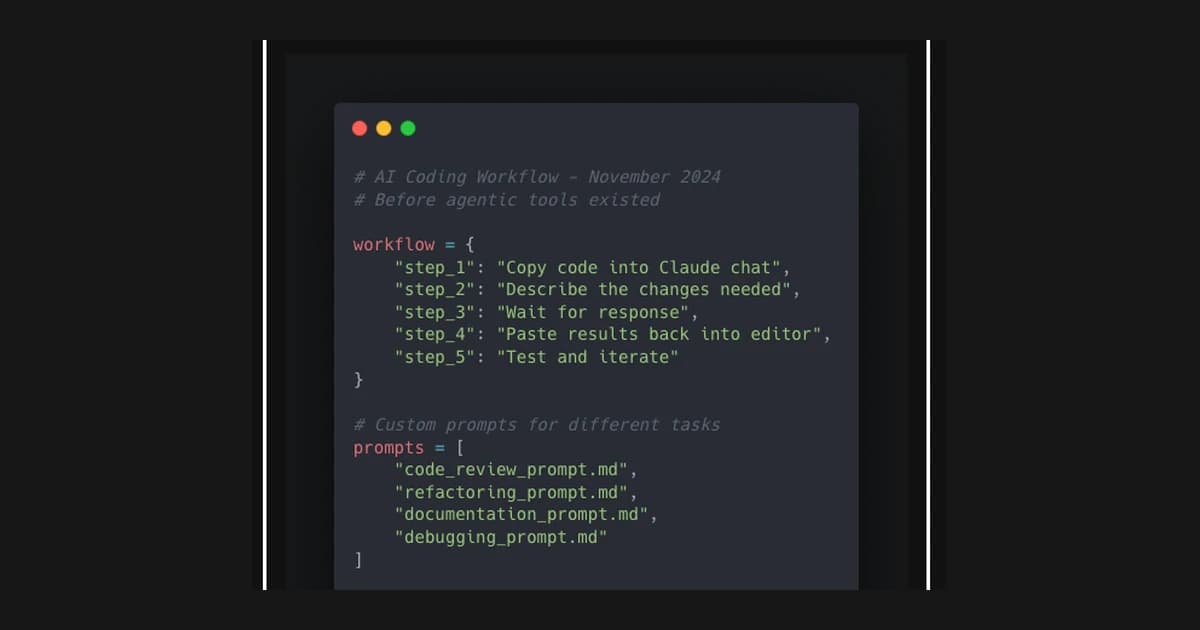
This is a snapshot from November 2024 - before Claude Code CLI, before agentic coding tools, before AI could autonomously navigate codebases and execute multi-step tasks. Reading this now feels like looking at photos from a different era.
Back then, my workflow was manual and conversational. I would copy code into Claude's chat window, describe what I wanted, and paste the results back into my editor. I built custom prompts for different tasks - code review, refactoring, documentation, debugging. Each prompt was carefully tuned with examples of what good output looked like. It felt cutting-edge at the time.
The paradigm was "AI as thought partner." I'd use Claude to think through architecture decisions, explore different approaches, and catch bugs before they shipped. But every interaction required me to be the bridge between the AI and my codebase. Context was limited. Iteration was slow.
What strikes me now is how quickly this became obsolete. Within months, agentic tools landed that could read files, execute commands, run tests, and iterate autonomously. The conversation-based workflow I documented here was replaced by something fundamentally different: AI that could act, not just advise.
I'm keeping this as a record of how fast things move. If you're reading this in 2025 or beyond, know that what seemed revolutionary in November 2024 - treating Claude as a "collaborator" through chat windows - was just the beginning of something much bigger.
The constraints that shaped the workflow
The limitation was not intelligence. It was context. I had to decide what to paste into the chat, what to summarize, and what to leave out. That forced a discipline that I still value: reduce the surface area to the smallest useful slice before asking for help.
It also forced me to think in chunks:
- extract the failing unit
- isolate the error
- present the minimal reproduction
- ask for a fix with explicit output expectations
This is still how I work today. The tools changed, but the principle stayed.
What I learned from the “manual” era
Two lessons carried forward:
- Clarity beats cleverness. The highest leverage came from writing precise instructions, not elaborate prompts.
- Iteration beats genius. The first response was rarely perfect, but a tight feedback loop produced reliable results.
That period taught me how to pair with AI as if it were a colleague: give it context, set the constraints, and review the output like you would review a teammate’s work.
What changed with agentic tools
Agentic tools removed the bottleneck of copy‑paste, but they introduced new ones: runtime controls, approvals, and error recovery. The model could act, but I still needed to define the standards for what “done” meant.
The most useful shift was treating AI as part of a system, not a standalone assistant. That meant logs, artifacts, and repeatable routines rather than one‑off prompts.
Why I keep this story
This post is a time capsule. It captures the moment before AI could read files, run tests, and navigate a repo. It reminds me how quickly the baseline moves. It also reminds me that the core skills are not about tools. They are about judgment, clarity, and the patience to iterate.
That is the real takeaway. The tools will change again. The discipline of working clearly will not.
How I structure requests now
I keep the format boring:
- goal in one sentence
- constraints (time, stack, scope)
- expected output (file list or code diff)
- verification step (tests or checks)
That structure works with Claude Code, with Codex, or with any future tool that comes next. It removes ambiguity and makes the response reviewable.
The role of artifacts
The biggest shift in my workflow is the emphasis on artifacts. I want:
- file changes I can diff
- commands I can rerun
- logs I can keep as evidence
This makes the output resilient. If I have to hand work off to a teammate, the trail is already there.
What I still do manually
Some things never went away:
- reviewing the final result
- testing the behavior, not just the code
- sanity‑checking edge cases
AI removes effort, not responsibility. I still own the outcome.
Why this matters beyond AI
This workflow is really a productivity discipline. The same structure works for delegating to humans: clear goals, clear constraints, and clear outputs. AI just made it obvious.
That is why I keep this story around. It is a reminder that the fundamentals of good execution outlast any tool.
The question I ask before every prompt
Before I send a prompt, I ask: what is the smallest output that still proves this is working? That one question prevents over‑prompting and keeps the work grounded in artifacts.
It is the same question I ask of humans. The result is the same: shorter briefs, clearer outputs, and less rework.
Why this still matters
Tools will keep changing. The discipline of clear requests, constrained scope, and verifiable output will not. That is the part that makes every new model feel easier to use. It is not the model. It is the system around it.
Related Guides
- Brief AI Like a Pro Course — A complete briefing system
- AI Agents Setup Guide — Modern agent patterns
- CLI Automation Guide — Practical automation
Related Stories
- The Tokens I Deleted — Efficient prompting
- MCP Explained in 10 Minutes — How tools changed everything
Learn More
For a complete prompting system, join Brief AI Like a Pro.