02 · Article
On this page22 sections
- The Architecture
- The Tools (MCP)
- The Costs (kept honest)
- When to Use Agents vs Manual
- Building Your Own
- The routing layer is the real product
- Human checkpoints that prevent errors
- The failure modes to watch for
- What I measure to keep it stable
- Guardrails for sensitive work
- The architecture lesson
- Where it breaks (and how I catch it)
- The artifact system that keeps it honest
- What I automate vs what I keep human
- Prompt structure that reduces drift
- How I decide “done”
- The security mindset
- The maturity curve
- Key Takeaways
- Related Guides
- Related Stories
- Learn More
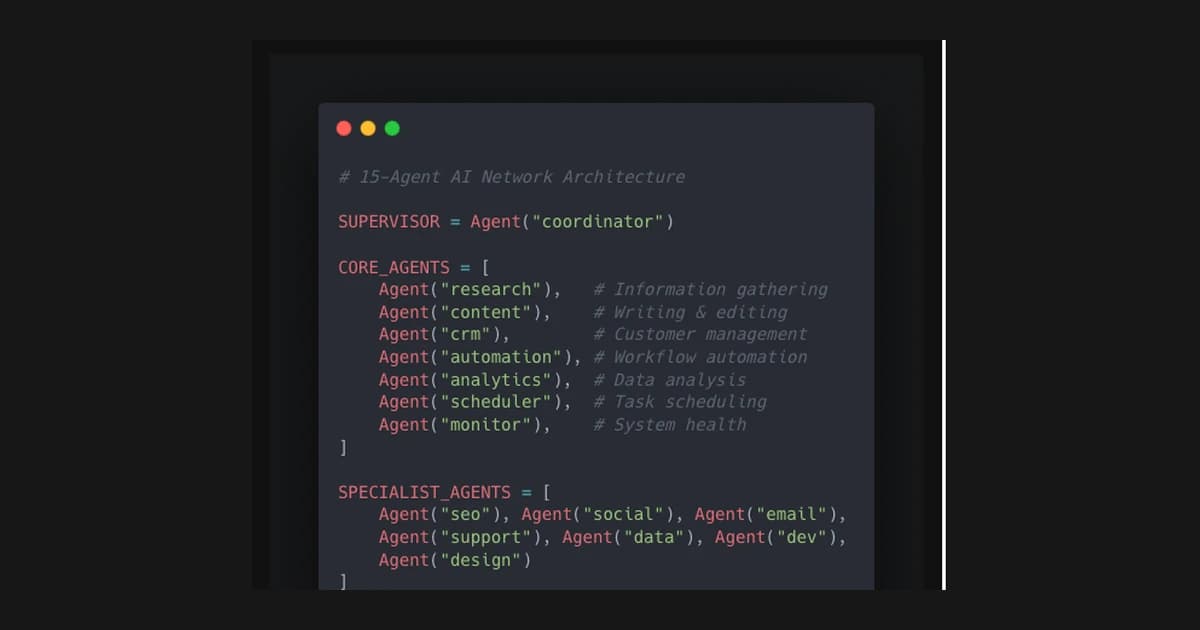
I run 15 AI agents daily. Not as an experiment - as my actual operating system.
One supervisor coordinates everything. Seven core agents handle recurring work. Seven specialized agents tackle domain-specific tasks. 75 tools connect them to the outside world.
Here's exactly how it works and what it costs.
The Architecture
Supervisor Agent (Opus 4.5)
The brain. When a task comes in, the supervisor:
- Analyzes the request
- Decides which agent(s) should handle it
- Routes the task appropriately
- Coordinates multi-agent workflows when needed
Why Opus? It's more expensive per token, but better at nuanced routing decisions. The supervisor doesn't do much work itself - it just decides who should.
Core Agents (Sonnet 4.5)
Seven agents handling the daily recurring work:
Research Agent - Web search, data gathering, competitive analysis. Connected to search APIs and can browse specific sites.
Content Agent - Writing, editing, formatting. Handles LinkedIn posts, email drafts, documentation. Knows my voice from training examples.
CRM Agent - Lead tracking, follow-up scheduling, contact management. Integrated with my database and calendar.
Outreach Agent - Email sequences, personalized DMs, LinkedIn messages. Generates variants based on recipient context.
Planning Agent - Calendar management, scheduling, deadline tracking. Can propose and adjust timelines.
Resources Agent - File management, asset organization, documentation updates. Keeps the workspace clean.
SWOT Agent - Analysis, strategy, decision frameworks. Good for stepping back and evaluating options.
Specialized Agents (Sonnet 4.5)
Seven more for domain-specific work:
- Code Review Agent
- Design Feedback Agent
- Data Analysis Agent
- Client Communication Agent
- SEO Agent
- Social Media Agent
- Technical Writing Agent
These get called less frequently but handle tasks the core agents aren't optimized for.
The Tools (MCP)
Model Context Protocol is the integration layer. Each tool is a defined capability an agent can invoke.
Examples from my setup:
- web_search: Search the internet for information
- read_file: Read contents of a local file
- write_file: Write content to a file
- send_email: Send email via configured provider
- calendar_create: Create calendar event
- database_query: Query the CRM database
- screenshot: Capture screen content
- browser_navigate: Navigate to a URL
75 tools total. Some are simple (read a file), some are complex (multi-step browser automation).
The key insight: tools are cheap to add but expensive to maintain. Every tool needs error handling, documentation, and testing. I add tools only when agents repeatedly need capabilities they don't have.
The Costs (kept honest)
I am not publishing precise dollar numbers here because they fluctuate based on workload, model choice, and tool usage. The useful takeaway is the cost shape:
- once the system is defined, marginal cost per task stays low
- the real risk is vague inputs, not model pricing
- the time savings are the main compounding effect
If you want to be rigorous, track cost per verified output rather than cost per prompt. It keeps incentives aligned with real value.
When to Use Agents vs Manual
Agents excel at:
- Repeatable tasks with clear inputs/outputs
- Research that requires synthesizing multiple sources
- First drafts of content that you'll refine
- Data processing at scale
- Monitoring and alerting
Agents struggle with:
- Novel problems without patterns to follow
- High-stakes decisions requiring human judgment
- Creative work where "good enough" isn't enough
- Relationship-dependent tasks (some things need a human touch)
My rule: if I've done the task more than three times and can describe it clearly, it's a candidate for an agent.
Building Your Own
Start simple:
-
One agent, one job. Don't build 15 agents on day one. Build one that handles your most annoying recurring task.
-
Clear boundaries. Define exactly what the agent can and can't do. Scope creep kills agent effectiveness.
-
Feedback loops. Review agent outputs. Refine prompts. Add examples. Agents improve with iteration.
-
Tool discipline. Add tools when needed, not when cool. Every tool is maintenance overhead.
The stack I use:
- Claude API for reasoning
- MCP for tool definitions
- Supabase for persistence
- Custom orchestration for multi-agent workflows
You don't need anything this complex to start. A single Claude API call with good system prompt is already an agent.
The routing layer is the real product
The thing that actually makes a multi‑agent system useful is the routing layer. It decides which agent should run, which tools should be available, and what the boundaries are. Without routing, you just have a pool of models that all try to do everything.
The routing rules I use are simple:
- if it touches customer data, use the safest agent
- if it is research, use a fast model
- if it is execution, use the smallest capable model
This keeps costs predictable and outcomes consistent.
Human checkpoints that prevent errors
Every system needs a human checkpoint. I use three:
- Before execution — verify the brief and expected output
- After execution — review artifacts, not summaries
- Before publishing — confirm the final state matches intent
This does not slow the system down. It keeps it honest.
The failure modes to watch for
Agent systems fail in predictable ways:
- vague inputs that produce vague outputs
- too many tools without clear ownership
- no audit trail when something goes wrong
The fix is boring: clear instructions, narrow scopes, and artifacts you can inspect later.
What I measure to keep it stable
The network stays healthy only if I measure the right thing. I keep a small set of signals that matter more than raw task volume:
- verification rate (what percent of outputs have artifacts I can re‑check)
- handoff clarity (how often an agent asks for clarification)
- rework rate (how many tasks require a second pass)
- latency to completion (not speed, but predictability)
If verification drops, I tighten the brief. If rework increases, I narrow the scope. These are cheap fixes that prevent the system from drifting.
Guardrails for sensitive work
Some tasks should never be fully autonomous. Anything touching client data or money goes through a human checkpoint. I treat the agents like interns: they can do the heavy lifting, but I own the final decision.
This keeps the system useful without creating hidden risk.
The architecture lesson
The bigger the system gets, the more the architecture matters. Routing, logging, and artifact storage become more important than model choice. If you want the system to survive, build the boring plumbing first.
That is the part nobody likes to talk about, but it is the part that makes the network reliable.
Where it breaks (and how I catch it)
The most common failure is silent drift. Outputs still look plausible, but the system starts ignoring constraints. I catch this by periodically re‑running old tasks and comparing artifacts. If the artifacts change without a reason, something drifted.
I also look for:
- agents that “explain” instead of “do”
- missing artifacts
- tasks that take longer over time
These are early warning signs. When I see them, I shrink the scope and force a tighter rubric.
The artifact system that keeps it honest
Every agent writes to a shared evidence trail. The trail is simple: command outputs, file diffs, and a short summary of what changed. I avoid abstract summaries because they are hard to verify later. The artifact is the proof.
If I cannot show the artifact, I treat the work as unverified. That keeps the system honest and makes handoffs easier when I’m not the one reviewing.
What I automate vs what I keep human
The most important choice is what not to automate. I keep human control over anything that changes user‑facing messaging or irreversible actions. The system can draft, propose, and execute, but it cannot decide whether a change should be public.
The line I use:
- Automate: research, diffs, drafts, checks, summaries
- Human‑gate: publishing, pricing, legal copy, public messaging
That boundary prevents accidental damage while still keeping velocity high.
Prompt structure that reduces drift
Most drift comes from vague prompts. I use a short structure that stays consistent:
- context (1–2 sentences)
- task list (bulleted, ordered)
- constraints (what not to change)
- verification step (what proves success)
This reduces the variability between agents. It also makes results easier to compare.
How I decide “done”
Done is not “looks good.” Done is:
- the output matches the constraints
- the artifacts exist
- a human can verify without guessing
That is the line that keeps the system from turning into a content factory with no accountability.
The security mindset
Any system that can act needs a security mindset. I isolate secrets, limit scopes, and make sure the agent never has more access than it needs. If a tool can post or send messages, it is gated behind explicit approval.
I treat every tool like it could be misused, because it can. The safeguard is not the model. It is the boundary around the model.
The maturity curve
The maturity curve is predictable:
- Manual prompts
- Single‑agent automation
- Multi‑agent orchestration
- Auditable workflows
If you skip the audit layer, you end up with velocity but no trust. The audit layer is what turns automation into infrastructure.
Key Takeaways
-
Agents are economics, not magic. They're worth it when the cost is lower than the alternative (your time or hiring someone).
-
Supervision matters. A good routing layer prevents agents from doing work they shouldn't. Opus for routing, Sonnet for execution.
-
Tools are the moat. Anyone can call an API. The value is in the integrations specific to your workflow.
-
Start now, scale later. You don't need 15 agents. You need one that saves you an hour a day.
The primitives exist. The patterns are documented. The cost is negligible.
What's stopping you from building your first agent?
Related Guides
- AI Agents for Solo Founders — Build a 24/7 team without hiring
- AI Agents Setup Guide — Patterns, stacks, and guardrails
- Overnight AI Builds Guide — Ship more while you sleep
Related Stories
- How I Built 14 AI Agents — The journey from one agent to a team
- MCP Explained in 10 Minutes — Plain-English guide to the tool layer
Learn More
If you want the full build system, start with the AI Product Building Course.
Questions about agent architecture? Reach out on LinkedIn or Twitter.